equipment to tune with

JSM

Active member
Re: equipment to tune with

cvcsmkr said:
can someone elaborate a little more on the wiring of the the g1 to the ostrich to the laptop.
i understand the stock chip is piggybacked to the g1, right?
then the ostrich emulator plugs into the open socket on the g1, right?
you do the datalogging with tuner pro thru aldl, right?
when you actually want to start fooling around with the tables, do you connect the ostrich to the laptop and edit it?

what are the syty ecm def & aldl files? do these get loaded into turnepro?

please break it down for the slow ones:)
thanks

Yes, the ostrich plugs in via USB and allows you to edit bin information real time.

Yes they get loaded, one of the posts might be this one I detailed what each file does within tunerpro.

NNNNNNNOOOOOOOOOOO PPPPPPPPPRRRRRRROOOOOOOOOOBBBBBBBBBBBLLLLLLLLLLLEEEEEEEEEEEMMMMMMMM
 

cameronsclone

New member
Re: equipment to tune with

JS Manufacturing said:
Yes, the ostrich plugs in via USB and allows you to edit bin information real time.

Yes they get loaded, one of the posts might be this one I detailed what each file does within tunerpro.

NNNNNNNOOOOOOOOOOO PPPPPPPPPRRRRRRROOOOOOOOOOBBBBBBBBBBBLLLLLLLLLLLEEEEEEEEEEEMMMMMMMM
What a smartass :lol:
 

bezerk

New member
Re: equipment to tune with

what about tuning with EGT to keep control on deto? if the knocksensor isn't working?
 

skwayb

NWSTP
Re: equipment to tune with

cameronsclone said:
So you can use the ostrich as a chip?

I know it was already answered but another tip is.... it is the ultimate alarm.

I have my Ostrich in the glove box and I just disconnect it and take it with me. There is no way the truck would even start since there is now no Chip in there. LOL
 

cameronsclone

New member
Re: equipment to tune with

skwayb said:
I know it was already answered but another tip is.... it is the ultimate alarm.

I have my Ostrich in the glove box and I just disconnect it and take it with me. There is no way the truck would even start since there is now no Chip in there. LOL
Haha, good plan.
 

Black Knight

I Glow Therefore I am
Re: equipment to tune with

Jeff do you know of or is there any plans for a group purchase on the whole moates package??

I just went on there and priced everything it's just shy of $300, I was gonna buy it all and then thought about asking first because they did show a discount for 10 or more.

Or if anyone knows of a deal going on, cause i'm ready to start picking this stuff up!!!
 

ashman

------
Re: equipment to tune with

that might be a good thing for Craig to consider...there's probably a number of folks interested in a GP of the basics.

BTW...Paul...please elaborate on the Bluetooth Autoprom you have, for those that might want to dip their toes :)

how does the ALDL connect to the "tooth" autoprom?
 

skwayb

NWSTP
Re: equipment to tune with

ashman said:
that might be a good thing for Craig to consider...there's probably a number of folks interested in a GP of the basics.

BTW...Paul...please elaborate on the Bluetooth Autoprom you have, for those that might want to dip their toes :)

how does the ALDL connect to the "tooth" autoprom?

The bluetooth version of the autoprom lets you connect to it with a bluetooth adapter (the one I got from Moates was a USB Bluetooth adapter) on your laptop wirelessly .... i.e. No WIRES to connect your laptop to the Autoprom. You can be upto 20 feet outside the vehicle with your laptop (shorter or farther depending on RF interference) and still connect to the autoprom and be able to emulate and log.

How it works is, the autoprom will show up as a Virtual Serial Port in the bluetooth software. You pair your bluetooth adapter in the software with the Autoprom. If it asks you for a password, enter in default. default is the pairing password. You configure your bluetooth adapter to connect to it. Have the bluetooth software search for any bluetooth deives. It will show up. Connect to the serial port with the bluetooth software and then have Tunerpro Connect with the Preferences in the ALDL section set to AUTOPROM mode. It will see the autoprom and connect. With the new patch Dig released it will connect right up to the ALDL stream when you want and you are able to emulate and log at the same time. This all sounds much more complicated than it is. It was very easy to setup and get working. I think it maybe took 5 mins max to install and configure the software before you were connected wirelessly thru bluetooth to the bluetooth autoprom.

Moates does have a BT Ostrich in the works, so I am gonna swap mine out for that so I can do the same thing. Once you see it working wirelessly you are like... sweet no more wires to the laptop to mess with.

Now the BT Autoprom still has a USB connector on it, so if you want to you can still connect a USB cable to it like you would normally would and not use the bluetooth adapter at all.

Now there is a caveat to all this.. The Autoprom needs power.. so it needs to have the ribbon cable hooked up to it and the ECM. (or a USB cable for power if the ribbon cable to the ecm is not hooked up) I don't believe ALDL passthru mode will work with the Bluetooth adapter. If you want to use it in this mode, it needs to be hooked up to a USB cable. I don't see why you would at this point. I need to test this again.

I will try to post a video of it working wirelessly so you can see it in action.
 

ashman

------
Re: equipment to tune with

excellent write up Paul...thanks for taking the time.

clarify this...where does the autoprom get the ALDL info?
 

ashman

------
Re: equipment to tune with

thought i'd add some pics to this thread

these are the "bare minimum" components to allow you to chip/burn. these alone will not get you to the new code $59 requirements. you'll need a 3-bar MAP and wideband 02 sensor for that.


1. Moates flash-n-burn. This will be needed to burn/write information to the chip. There are others available but, this one is usb and is easy to use.

2. chip. I've used the ATMEL AT29C256 in this example. There again, there may be others available

3. Moates G1. Note..the G1 is NOT REALLY required. If your the industrious type and good with a soldering iron, or have an extra Memcal laying around...you can actually remove the stock chip from the memcal and install the burn/writeable chip in its place.

this is the stock ECM/ECU with the stock Memcal (minus blue top)

ecm_stock_memcal.jpg


this is the stock Memcal with the components labeled

memcal.jpg


side view of memcal

memcal_sideview.jpg


this is the Moates G1 with a "chip" installed

G1_w_chip.jpg


this is the memcal with the moates G1. Electrically, the G1 is just "bypassing" the stock chip, but keeping the ESC circuitry active.

memcal_G1_chip.jpg


this is the memcal/moates g1 installed into the stock ECM. notice how the memcal is now turn 90degrees from it original orientation and is underneath the ECU top cover

ecm_moates_g1.jpg


this is the Moates Flash-n-Burn (needed to write/burn the "chip")

Flash-n-Burn.jpg


hope these pics help you guys that are considering this route. if i missed something or got something wrong...please let me know..oh wait...i probably didn't have to tell ya'll that
 
Last edited:

QUICK STORM

B.A.M.F. BMW Tech
Re: equipment to tune with

where does the flash n' burn go in relationship to the rest of the stuff needed to run code 59?
 

ashman

------
Re: equipment to tune with

the flash-n-burn and chip can be used in place of the Ostrich. it's just another option..slightly cheaper than the ostrich.
 

SBNova

New member
Re: equipment to tune with

The flash and burn goes next to your laptop (or desktop). It erases and reprograms your chips. Then you take them and plug them into the adapter in the ECM.

The flash and burn isnt installed in your SyTy. An Ostrich or an Autoprom would be installed, by attaching the ribbon cable from the unit to your ECM. The plug on the end of the ribbon cable replaces the chip in the ECM.

*** great pictures Ashman, that should be a big help to everyone starting out.
 

QUICK STORM

B.A.M.F. BMW Tech
Re: equipment to tune with

thanks, i want to get the ostrich, hopefully i'll get a good price with scotts GP package. i'm going to gather all the stuff i need for the code 59, i freaking cant wait to use it.

on a side note, how hard is the lc1 to install?
 

skwayb

NWSTP
Re: equipment to tune with

ashman said:
excellent write up Paul...thanks for taking the time.

clarify this...where does the autoprom get the ALDL info?

You get one of the Moates ALDL cables with the Autoprom. It plugs into the Autoprom and the ALDL connector under the dash. The Autoprom can either be in passthru mode so you could use the Autoprom as just an ALDL USB cable and then log in Datamaster with it. Or if you set the switch on it to Autoprom mode then in Tunerpro you can Emulate and Log at the same time. (Provided you have the ALDL Patch Dig made. Code59 already has this patch rolled into it so there is nothing you need to do with it.)

Here is what you get with the AutoProm. (Minus the USB Bluetooth Adapter) The chip connector on top of it is basically the Flash and Burn. It is incorporated into the Autoprom. So you can read chips and burn chips also.

Autoprom%20004.jpg


Here is what the Autoprom looks like with all the connectors on the back of it.

From left to right you Have the ribbon cable connector that goes to the ECM, Firewire Connector for the 3 A/D channel connector (so you can input 3 more devices and TunerPro can add those 3 items to the ALDL Stream. So you can put Fuel Pressure, EGT, Another WBo2, Wastegate output, etc. and have it added to the ALDL log), USB Connector for your Laptop, Moates ALDL Cable connector, 10K ALDL Switch, and the last switch is for ALDL passthru or AutoProm mode.

Autoprom%20011.jpg


Here is mine installed.
Autoprom%20018.jpg


3 A/D Connector

Autoprom%20019.jpg


I permenately installed the ALDL cable and the USB Cable under the Dash.
Autoprom%20015.jpg


USB Cable.

Autoprom%20014.jpg


I then have a Female to Male USB Cable so I can plug into the one under my dash to the Laptop. This was all before I got my Autoprom upgraded to the Bluetooth Version. Now there is no USB Cable(s) going to my Laptop. I just have a USB Bluetooth Dongle connected to the laptop and wirelessly connect to the Autoprom.

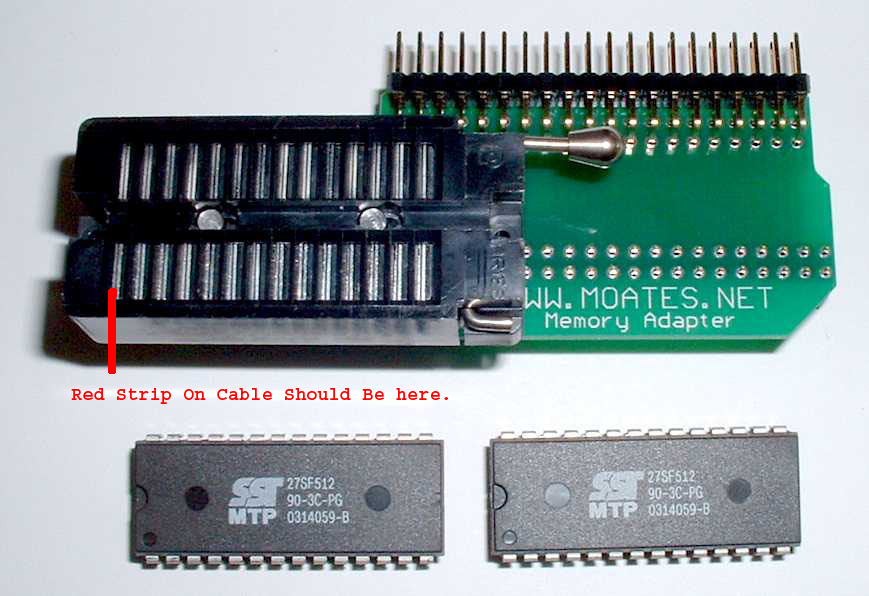
Just so everyone knows which way to install the ribbon cable on the Autoprom/Ostrich in the ECM. This is also PIN 1 position of where you would install a chip.

GP10.jpg
 
Last edited:
Re: equipment to tune with

This a greatthread with good info. Thanks to all. Please school me on the difference between the autoprom and the ostrich?
Thanks again
 

skwayb

NWSTP
Re: equipment to tune with

Ostrich - Emulation ONLY. Has 8 Banks build in. You can upload 8 different bins to it and switch between them in Tuner Pro. It will remember the last one you selected. To Burn a final chip you will still need a chip burner and to log ALDL you will need an ALDL cable.

Autoprom - Think of it as the Flash and Burn(Chip Burner and Reader), USB ALDL Cable, Emulator all in one with 3 Analog to Digital Inputs as a bonus. You can emulate and log at the same time in TunerPro with it, or use it as an ALDL cable when it is put in ALSL passthru mode so you can use as a . You can only upload 1 Chip to it at a time. You can

I have both and to be honest, if you just want to emulate and already have a burner and an ALDL cable I would get the Ostrich. Being able to upload a couple of bins to it is nice and it seems to emulate a little smoother and be less suseptible to RF interference as the Autoprom. You can upload an entire bin to the Ostrich or Switch banks on the fly and it doesn't die. The Autoprom sometimes will hiccup when you upload a bin and the Ty will die. The major draw back to the Ostrich is you need a laptop connected to it to switch banks. But not sure how big of a deal that is to you.

If you need a burner, emulator and cable the Autoprom will probably be the way to go. It is probably a little cheaper than buying them all seperate. If you want a record a few more inputs like EGT, Fuel Pressure, etc. then the Autoprom can do this in TunerPro. I had my WBo2, Fuel Pressure and EGT wired into it at one point. It was nice to be able to log the 3 extra items. At some point we might be adding this to Code 59 so that may not be a feature you would use. But is always nice to be able to log more information.
 

QUICK STORM

B.A.M.F. BMW Tech
Re: equipment to tune with

so i'm not completely understanding this, which is the best way to use code 59 for a rookie/just starting out tuner?
 
Top